top of page


20

Truly next level.
Disk OS 20 is the most advanced, fluid, and responsive version of Disk OS ever.
Disk OS 20 brings many new features to make your Disk Phone experience the best it's ever been.
Available this fall
System-wide UI


Disk OS goes 3D
For a more depth-of-field effect, elements now appear as if they're floating.
Notifications


More compact design
Notifications are more compact. Instead of taking up the entire length of the screen, they only take up as much space as needed.
Messages


Suggested actions
You'll now get a suggested action popup for calendar events, reminders, contact information, creating a note based on the person's message, and for opening files.1

Location in Messages
If a contact is sharing their location with you, you'll see it under their name in the Messages app.
Disk Voice

More natural and casual language
With the help of Disk Intelligence, you can use more natural language to interact with Disk Voice.

Ask for payment methods
Disk Voice can now select your card or ticket of choice in the Wallet app by asking. This feature won't work when Disk Phone is locked, ensuring your privacy.
Default Apps

Default calling app
You can now change your default calling app. If your app of choice isn't listed, you'll be able to browse through your selected apps and add it manually.

Default messaging app
You can now change your default messaging app. If your app of choice isn't listed, you'll be able to browse through your selected apps and add it manually.
Wallet

Scan items using the camera
You can scan a card, ticket, or pass by using the camera and it'll automatically be added to the Wallet app.
Parental Controls


Ask to communicate with new people
To ensure safety, you'll have the option to approve contact information before your child is allowed to communicate with them.
Streamlined quick shortcuts
There are four buttons at the top of your child's profile. These buttons allow you to quickly take action.
Maps

Disk Maps via satellite
Disk Maps will now work via a satellite connection for when you're in areas with no cell coverage.3

Adding more stops on your route
You can now add up to 15 stops on your route.
Multitasking
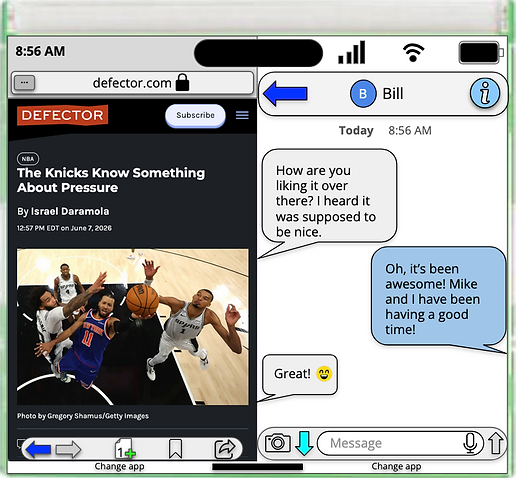

Disk Phone multitasking becomes next level
You can now put two apps side-to-side or top-to-bottom depending on Disk Phone's orientation.4
Improved Desktop Mode
Desktop Mode has become a lot more usable and fluid. There's also an unlimited amount of apps that can be open in Desktop Mode.
Performance
Up to
1.5x
Faster system responsiveness than Disk OS 195
Up to
1.1x
Faster download speeds over Wi-Fi, LTE, or 5G than Disk OS 195
Open apps up to
25%
Faster5
And a lot more.
More tasks via satellite
In addition to Disk Maps via satellite, you'll be able to send photos in the Messages app over satellite and connectivity has been improved.
dExplore optimizations
dExplore has been optimized to make webpages load much faster than before.
Screenshots
The top of Disk Phone's display, such as the dFaceUnlock cutout or Disk Interactive, will no longer appear in screenshots and screen recordings.
Health
You'll be able to scan a nutrition label using Disk Phone's camera to quickly add information to the Health app.
New writing tools
New writing tools, powered by Disk Intelligence, will be available in select apps.
Recovery Mode
A new Recovery Mode has been added.

Disk OS 20 is compatible with these devices.
Disk Phone
Disk 9 Plus
Disk 9
Disk 8 Plus
Disk 8
Disk 7 Plus
Disk 7
Disk 6 Plus
Disk 6
Disk A5 Plus
Disk A5
Disk A4 Plus
Disk A4
Disk OS 20 Deveoper Betas

Download Disk OS 20 Developer Beta 2 >


1. This feature requires a device supporting Disk Intelligence features. Disk Intelligence features are available on the Disk A5 and later.
2. The radar, wind speed, air quality, alerts, and visibility can be displayed at the top.
3. This feature requires a device supporting satellite connectivity. Satellite connectivity is available on the Disk 7 and later.
4. Only available on Disk Phone Plus models at this time.
5. Performance testing was conducted in March, April and May 2026 using a Disk A4, Disk 7, Disk 8 Plus, and Disk 9 running Disk OS 19.5.1 and a pre-beta version of Disk OS 20.
Footnotes (Disk OS 20)
bottom of page